Tuesday, June 1, 2010
Getting ready for my tutorials!
I have every intention of starting my tutorials/projects today, but I have THE worst migraine ever. So it will have to wait until later today when this migraine is gone. I did want to say that www.cricutmachine.com is having a 50% off all of there carts today :) Matt picked up 4 carts for me today.
 The new cindy loo, give a hoot, just because cards, and once upon a princess. I am super excited! :) I will be back later after this migraine goes away.

Sunday, May 30, 2010
Cricut Circle

Saturday, May 29, 2010
Blog Make Over
So, I bought a kit from http://sweetshoppedesigns.com/ I really like my blog now :) I just can't figure out how to do the background :( I will have to email them or something. It was really easy (but time consuming) to put together. I can't wait to start really using my blog!! I am SO excited. My goal is to start posting tutorials on June 1st :) So excited :)
Friday, May 28, 2010
Yep! New gypsy update is AWESOME!!
I've played with the new update for about 30 minutes to an hour. I LOVE the new options!! :) I took some pictures for the people who are at work and can't do there updates. :)
 This is the new main screen. My gypsy starts up SO much faster now. I love it. The new middle icon is the picture option.
 New picture function. You can upload pictures and save them to your Gypsy. These are the ones that were pre loaded onto your Gypsy. I think this would be wonderful for people to put there pictures on here that they want to scrap. Then they can just flip through them and use them for inspiration for a LO while they are waiting for kids to get out of football practice, or whatever. I also like that I can upload cards I want to scraplift so I can make the cuts for them while I am just sitting around. It's a really neat function. I really like it.
 The colors on the pictures are awesome!! My camera doesn't do it justice. I love that you can blow up the picture all the way. It's nice.
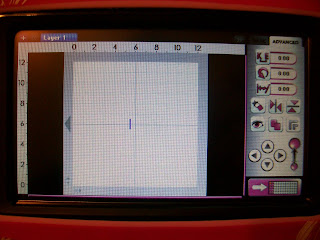 Here is the new mat area. It seems to me like the mat is smaller, which I was hoping didn't happen, but all of the new functions make up for it! I love the ruler on the top, the different layering options. Also using the resizing slide on the bottom rightish works a lot faster too. It's easier to go from really small to a full size image. All of the buttons seem to be bigger to, and the screen is more responsive then it was before. I used to have to push a button 5 times before it would register. It registers it on the first push. It's SUPER nice. Oh yea, this picture is the "advanced" option. the new button is the hide contour button (which is great)
 This is the "basic" option. nothing here really changed. The buttons seem to be bigger, and they are more responsive. I LOOOOOVE it!!
 Here is the hide contour option. You can select parts of the inside of the image (like I did in red) and you can hide it. So if you wanted a more bold image, then you could get rid of some of the cuts. I love the new possibilities with this.
 Here I am playing with the new layer button. They said you can name your layers, but I haven't figured it out. It's a lot more easier to see which layers you have, and it's easier to pick the layer you want to use. I love it that I can still see the different layers in grey. I loved matching different images (size wise) on different layers. That was one of my favorite options.
 Do you see the little eyeball there (on layer1) This turns off the "grey" image on each layer. I LOVE this!! you can match up the different sizes (like.. a card on one layer, then an envelope on another layer) then turn off the back layer and mess with the new layer. It was so frustrating sometimes to have so many lines and images mixing together. It's wonderful.
 I turned off the eyeball here. See how the butterfly went bye bye?? Now I can add stuff to layer 2 w/o being distracted by the butterfly on layer 1.
 My last wonderful function!! I am sure there is more, but this is what I have found so far. I always used to get so frustrated because I could never remember which purple button was which. Now they have labels to say "shadow" "layer" etc. It's so much easier to use! Also searching for images is faster now too. :)
THANK YOU PROVOCRAFT!! It's like christmas :)


THANK YOU PROVOCRAFT!! It's like christmas :)
New gypsy update=AWESOME!!
I am doing my gypsy update right now. And from what I've heard, it's going to be awesome!!! I am really excited!! I got the following information from www.cricutcritters.com
The new Gypsy upgrade includes specifically:
New Features:
• The much-anticipated Photo App is now available for Gypsy by Cricut users.
• The ability to hide-contours enabling users even greater ability to customize and create new designs, hide any part of an existing shape for greater customization Hidden contours will save when the design is saved.
• Rulers for the mat screen so users can more readily see the actual size of the shapes they cut.
• Feature keys now show descriptive text and icons to help users make better use of their cartridges without the use of the printed manual.
• Gypsy can now be restored at home if required.
• Gypsy now displays “Busy Syncing…” while connected to GypsySync through your computer to inform users that it is not available for use while it is in Syncing mode.
• Cartridges can now be added to Gypsy faster and more reliably than before.
New Cricut Cartridges Viewable with the Update:
• Wall Décor and More
• Freshly Picked
• Cindy Loo
• Mini Monsters
• Disney/Pixar – Toy Story
Enhancements:
• Tabs have been added to the layers making it easier to navigate a design with multiple layers.
• The ability to hide layers making it easier to design.
• The ability to name your layers and improve organization.
• The ability to reorder layers making it easier to design
• Gypsy now “powers on” in less than half the time it did before.
Bug Fixes:
• Minor cosmetic improvements and bug fixes.
I am so so excited about this update. It's going to fix a lot of issues that I've been having with my baby G. I can already tell you that my G powers up a lot faster :) That is all I know so far. hehe. I have nothing planned today except for making a ton of wedding phone calls and exploring the new stuff on my G. So I will update tomorrow with that I think :)
The new Gypsy upgrade includes specifically:
New Features:
• The much-anticipated Photo App is now available for Gypsy by Cricut users.
• The ability to hide-contours enabling users even greater ability to customize and create new designs, hide any part of an existing shape for greater customization Hidden contours will save when the design is saved.
• Rulers for the mat screen so users can more readily see the actual size of the shapes they cut.
• Feature keys now show descriptive text and icons to help users make better use of their cartridges without the use of the printed manual.
• Gypsy can now be restored at home if required.
• Gypsy now displays “Busy Syncing…” while connected to GypsySync through your computer to inform users that it is not available for use while it is in Syncing mode.
• Cartridges can now be added to Gypsy faster and more reliably than before.
New Cricut Cartridges Viewable with the Update:
• Wall Décor and More
• Freshly Picked
• Cindy Loo
• Mini Monsters
• Disney/Pixar – Toy Story
Enhancements:
• Tabs have been added to the layers making it easier to navigate a design with multiple layers.
• The ability to hide layers making it easier to design.
• The ability to name your layers and improve organization.
• The ability to reorder layers making it easier to design
• Gypsy now “powers on” in less than half the time it did before.
Bug Fixes:
• Minor cosmetic improvements and bug fixes.
I am so so excited about this update. It's going to fix a lot of issues that I've been having with my baby G. I can already tell you that my G powers up a lot faster :) That is all I know so far. hehe. I have nothing planned today except for making a ton of wedding phone calls and exploring the new stuff on my G. So I will update tomorrow with that I think :)
Sunday, May 23, 2010
Tutorial Question?
Hello everyone! I am just taking a break from my week long scrapfest. I've been working on cards for Matt, and decorations for our Holidaypalooza. While Matt was gone, he missed a lot of Holidays, so we are celebrating all of them in the first week he comes home! haha. I've been doing tutorials for everything I've been making, but sadly, I can't post them until he comes home. So while I am waiting for him to come home, I am working on stuff to fill up my blog until he comes home. So, my question is...
What kind of tutorials would you all like to see?? Or what kind of stuff would you like me to show on a video or on a written tutorial. (no, I wont dance, or sing or do anything goofy haha!)
Also, I forgot to mention that provocraft came out with a toy story cartridge. I must have it! adorable.... :)
What kind of tutorials would you all like to see?? Or what kind of stuff would you like me to show on a video or on a written tutorial. (no, I wont dance, or sing or do anything goofy haha!)
Also, I forgot to mention that provocraft came out with a toy story cartridge. I must have it! adorable.... :)
Thursday, May 20, 2010
New cricut carts today :)
HELLLOOOOOO Thursday :)
Today Cricut announced 4 new cartridges. Freshly picked, Mini Monsters, Wall Decor and more, and Cindy Loo.
Cricut shopping
I have to admit, I am kind of upset, because the "hello thursday" advertising was wrong. I don't see a single image that was on the "hello thursday" advertising that is on any of the cartridges announced today. No Cat cartridge, no "man" cartridge, no food with the little faces. I feel like a child on christmas that I didn't get what I wanted!! Don't get me wrong, the new cartridges are super cute (expecially the mini monsters one) but I had my hopes up for the cat, man, and food carts. The Hello Thursday advertising is still up though, so maybe those carts will be coming out next month... who knows. All I know, is that the 4 new carts are up at cricut.com! :)
Today Cricut announced 4 new cartridges. Freshly picked, Mini Monsters, Wall Decor and more, and Cindy Loo.
Cricut shopping
I have to admit, I am kind of upset, because the "hello thursday" advertising was wrong. I don't see a single image that was on the "hello thursday" advertising that is on any of the cartridges announced today. No Cat cartridge, no "man" cartridge, no food with the little faces. I feel like a child on christmas that I didn't get what I wanted!! Don't get me wrong, the new cartridges are super cute (expecially the mini monsters one) but I had my hopes up for the cat, man, and food carts. The Hello Thursday advertising is still up though, so maybe those carts will be coming out next month... who knows. All I know, is that the 4 new carts are up at cricut.com! :)
Subscribe to:
Posts (Atom)